
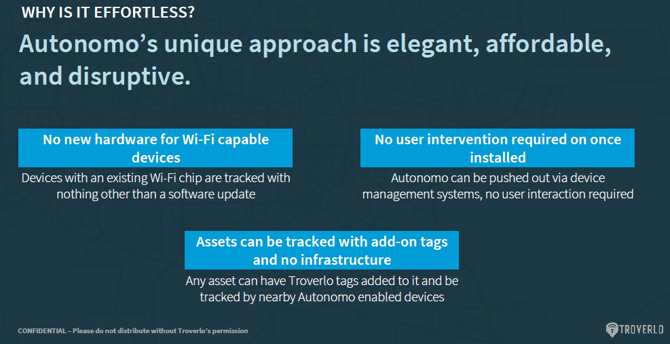
Autonomo enables virtually any device equipped with a Wi-Fi adapter to participate in the Troverlo network, regardless of operating system. Once installed, Autonomo operates silently in the background and requires no user interaction.
Because Autonomo can be deployed through existing enterprise mobility management (MDM) and IT management platforms, organizations can roll it out at scale, across tens of thousands of devices, with minimal operational overhead.
By integrating seamlessly into existing infrastructure, Autonomo provides enterprises and educational institutions with enhanced visibility and device management across their entire fleet, including devices that are not actively connected to a network.
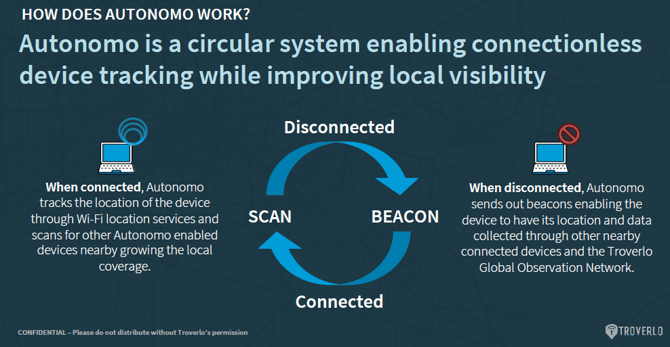
Devices running Autonomo function as distributed observation endpoints, increasing local coverage.
There are three ways to install Autonomo:
- Autonomo 4 - Installation via UI
- Autonomo 4 - Installation via command line (quiet install)
- Autonomo 4 - Intune setup info
Please see the below to find more details when installing Autonomo:
- Autonomo - Asset Category and Asset Sub-Category options
- Autonomo - Asset Groups
- Autonomo - Auto-provisioning
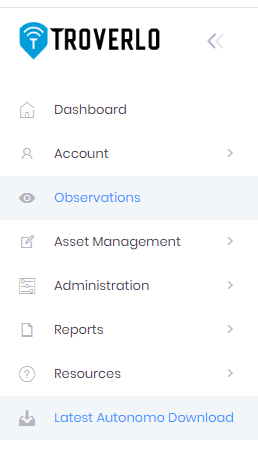
Please go to the Portal to find the latest version of Autonomo, select the last option on the Navigation panel.
Please note: the user that is installing Autonomo must have the "installer" role assigned to them. - see User (Team Member) Management
Find out more! Troverlo - Autonomo - Easy Tracking for Any Wi-Fi Device